


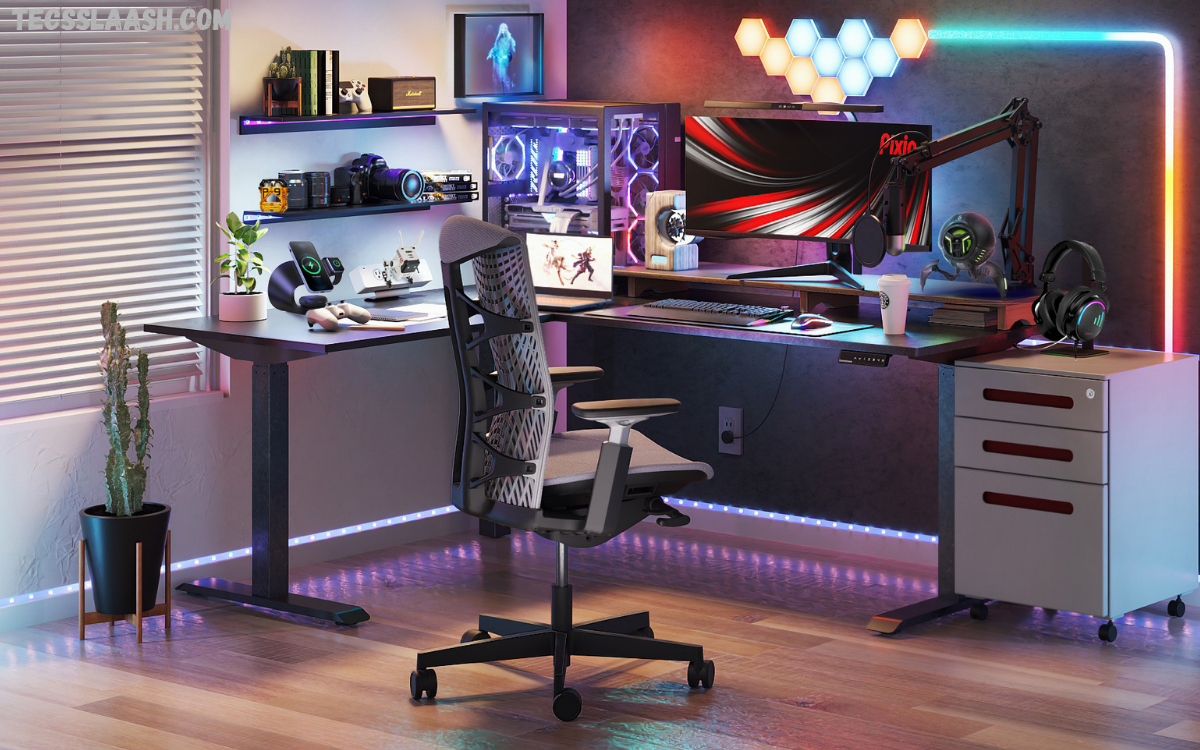
A gaming desk is more than just a place to keep a keyboard and monitor. It serves as the command center for every gaming session, streaming experience, competitive match, and productive workday. The right desk accessories improve comfort, enhance organization, reduce distractions, and create an immersive gaming environment that supports better performance.
Choosing the best gaming desk accessories can transform an ordinary setup into a professional gaming station. Whether you play competitive FPS games, immersive RPGs, racing simulators, or strategy titles, quality accessories improve ergonomics, cable management, lighting, audio, and overall functionality.
Why Do Gaming Desk Accessories Matter?
Gaming accessories are not simply decorative items. They directly affect gameplay, comfort, posture, and workspace organization.
A well-equipped desk helps players:
- Improve focus
- Reduce physical strain
- Organize gaming equipment
- Increase available desk space
- Protect expensive gaming gear
- Enhance streaming quality
- Create an immersive gaming atmosphere
Investing in quality accessories can improve both casual and competitive gaming experiences.
Large Gaming Mouse Pad
A large gaming mouse pad is one of the most important desk accessories.
Extended mouse pads cover both the keyboard and mouse area, providing:
- Smooth tracking
- Better mouse precision
- Stable keyboard placement
- Protection for the desk surface
- Cleaner overall appearance
Premium mouse pads feature stitched edges, waterproof coatings, and anti-slip rubber bases that remain stable during intense gaming.
Monitor Arm
A monitor arm instantly upgrades a gaming desk.
Instead of placing the monitor directly on the desk, a monitor arm lifts the display while creating additional workspace underneath.
Benefits include:
- Better viewing angles
- Improved posture
- Extra desk space
- Cleaner cable routing
- Easier multi-monitor setups
Gamers using ultrawide or dual-monitor configurations often consider monitor arms essential.
RGB Desk Lighting
RGB lighting creates an immersive gaming environment.
Modern RGB accessories allow users to customize colors, brightness, animations, and synchronization with games.
Popular RGB desk accessories include:
- LED light strips
- RGB monitor backlighting
- Smart ambient lights
- RGB desk lamps
- Corner light bars
Proper lighting reduces eye strain during nighttime gaming while improving room aesthetics.
Cable Management System
Messy cables make even expensive gaming setups look unorganized.
Cable management accessories help maintain a clean workspace.
Useful products include:
- Cable sleeves
- Cable raceways
- Cable clips
- Under-desk trays
- Velcro cable ties
Organized cables improve airflow, simplify maintenance, and reduce accidental unplugging.
Headphone Stand
Gaming headsets are valuable investments.
A dedicated headphone stand keeps them protected while freeing desk space.
Premium headphone stands include features like:
- RGB lighting
- USB hubs
- Wireless charging
- Built-in audio ports
Keeping headphones off the desk prevents scratches and unnecessary wear.
USB Hub
Modern gaming setups often include multiple devices:
- Gaming mouse
- Keyboard
- Webcam
- Microphone
- Stream deck
- External storage
- Charging cables
A high-speed USB hub expands available ports while keeping everything accessible.
USB-C hubs provide even greater flexibility for newer gaming systems and laptops.
Wireless Charging Pad
Many gamers use smartphones while playing.
A wireless charging pad keeps devices powered without adding cable clutter.
Benefits include:
- Cleaner workspace
- Faster charging
- Easy phone access
- Reduced cable wear
Wireless charging pads blend perfectly into modern gaming desks.
Desk Organizer
Organization improves productivity and gaming efficiency.
Desk organizers store:
- Flash drives
- Memory cards
- Controllers
- Charging cables
- Pens
- Small tools
Minimal clutter allows players to focus entirely on gameplay.
Gaming Controller Stand
Console and PC gamers often own multiple controllers.
A dedicated controller stand protects controllers from accidental damage while displaying them professionally.
Some models include charging docks that recharge controllers between gaming sessions.
Mechanical Keyboard Wrist Rest
Long gaming sessions place pressure on wrists.
A quality wrist rest provides ergonomic support while reducing fatigue.
Memory foam and wooden wrist rests remain popular choices because they offer comfort and durability.
Ergonomic Gaming Chair Mat
Gaming chair wheels can damage hardwood floors and carpets.
A chair mat protects flooring while improving chair movement.
Premium mats also reduce wheel resistance, making movement smoother during long sessions.
Adjustable Desk Lamp
Proper lighting improves concentration.
Gaming desk lamps now include:
- Adjustable brightness
- Color temperature control
- USB charging ports
- RGB modes
- Eye-care lighting technology
A quality lamp minimizes glare without affecting monitor visibility.
Desktop Speakers
Even gamers using headsets benefit from desktop speakers.
Speakers provide:
- Better entertainment
- Casual gaming audio
- Music playback
- Movie watching
- Group gaming sessions
Compact bookshelf speakers deliver impressive sound while occupying minimal desk space.
Microphone Boom Arm
Content creators and streamers benefit greatly from microphone boom arms.
Advantages include:
- Cleaner desk
- Better microphone positioning
- Reduced keyboard noise
- Professional streaming appearance
- Flexible adjustment
Boom arms significantly improve voice recording quality.
Read Also: Best Laptop Accessories for Students: Complete Buying Guide (2026)
Stream Deck
Stream decks have become essential for streamers and content creators.
Custom programmable buttons can control:
- OBS
- Discord
- Spotify
- Scene switching
- Lighting
- Recording
- Macros
This accessory increases workflow efficiency and saves valuable time.
Desk Shelf
A monitor shelf or desk riser creates extra storage while improving monitor height.
Items stored underneath include:
- Keyboard
- Notebook
- Controllers
- External drives
Desk shelves contribute to better posture and improved organization.
Smart Clock
A smart desk clock displays:
- Time
- Weather
- Calendar
- Timers
- Notifications
Some models integrate with smart home systems for voice control.
Air Purifier
Gaming rooms often become warm during extended sessions.
Compact desktop air purifiers improve indoor air quality by removing:
- Dust
- Pet hair
- Allergens
- Odors
Cleaner air contributes to greater comfort.
Cup Holder
Spilled drinks can destroy expensive gaming equipment.
Clamp-on cup holders keep beverages away from keyboards, mice, and other electronics.
This simple accessory prevents costly accidents.
Under-Desk Storage Drawer
Hidden storage drawers maximize desk organization.
Ideal for storing:
- Charging cables
- Batteries
- USB drives
- Cleaning cloths
- Gaming accessories
These drawers maintain a minimalist appearance.
Gaming Desk Fan
Small USB-powered desk fans improve airflow.
They help reduce heat during long gaming sessions, particularly in warmer environments.
Quiet fans provide cooling without distracting background noise.
Webcam Lighting
Gamers who stream or attend online meetings benefit from webcam lighting.
Ring lights and monitor lights improve video quality while maintaining natural skin tones.
Adjustable brightness helps create professional-looking streams.
Cleaning Kit
Gaming equipment collects dust quickly.
A desk cleaning kit should include:
- Microfiber cloth
- Screen cleaner
- Keyboard brush
- Air blower
- Cleaning gel
Regular maintenance extends equipment lifespan.
Choosing the Best Gaming Desk Accessories
Before purchasing accessories, consider several important factors.
Compatibility ensures accessories work with your existing equipment.
Build quality determines long-term durability.
Ergonomic features improve comfort during extended gaming sessions.
Cable management options maintain a clean workspace.
RGB compatibility helps synchronize lighting effects.
Available desk space influences accessory selection.
Budget should balance quality and long-term value.
Investing in fewer high-quality accessories often provides better results than purchasing many low-quality alternatives.
Building the Perfect Gaming Setup
A complete gaming setup combines functionality, comfort, and aesthetics.
An ideal setup typically includes:
- Spacious gaming desk
- Ergonomic chair
- Large mouse pad
- Monitor arm
- Mechanical keyboard
- Gaming mouse
- RGB lighting
- Cable management system
- Headphone stand
- USB hub
- Desk organizer
- Wireless charging pad
Every accessory should serve a practical purpose while contributing to a clean and organized environment.
Future Trends
Gaming desk accessories continue evolving with technology.
Emerging trends include:
- AI-powered lighting
- Smart cable management
- Wireless desks
- Integrated charging systems
- Modular desk accessories
- Eco-friendly materials
- Voice-controlled lighting
- Smart ergonomic monitoring
Future gaming desks will become even more intelligent, customizable, and efficient.
Frequently Asked Questions
What are the best gaming desk accessories?
Large mouse pads, monitor arms, RGB lighting, cable organizers, headphone stands, USB hubs, and ergonomic wrist rests are among the most useful gaming desk accessories.
Do gaming desk accessories improve performance?
Yes. Better organization, improved ergonomics, and reduced distractions help players remain comfortable and focused during gameplay.
Is RGB lighting necessary?
RGB lighting is optional, but it enhances immersion, improves room aesthetics, and can reduce eye strain when used as ambient lighting.
Why should I use a monitor arm?
A monitor arm improves posture, frees desk space, and allows flexible monitor positioning for greater comfort.
How can I organize gaming cables?
Cable trays, sleeves, clips, raceways, and reusable cable ties keep wires neat and easy to manage.
Are wireless charging pads worth buying?
They reduce cable clutter while keeping smartphones conveniently charged during gaming sessions.
Which accessories help streamers the most?
Microphone boom arms, stream decks, webcam lighting, monitor arms, and cable management accessories significantly improve streaming setups.
How often should gaming accessories be cleaned?
Dusting weekly and performing a deeper cleaning every month helps maintain performance and extends equipment life.
What is the most affordable gaming desk upgrade?
A large gaming mouse pad and basic cable management accessories provide excellent value while noticeably improving organization.
Can gaming desk accessories also improve productivity?
Yes. Organized workspaces, ergonomic equipment, better lighting, and efficient device management benefit gaming, studying, content creation, and professional work alike.
Conclusion
Selecting the Best Gaming Desk Accessories is one of the most effective ways to enhance comfort, improve organization, and elevate gaming performance. Every accessory, from monitor arms and RGB lighting to cable organizers and ergonomic wrist rests, contributes to a cleaner and more enjoyable gaming environment.
Building the perfect gaming setup does not require purchasing every available accessory. Instead, focus on products that improve daily use, support long gaming sessions, and complement your personal gaming style. A thoughtfully organized desk increases productivity, protects valuable equipment, and creates an immersive space where every gaming session becomes more enjoyable.

