


Best Video Editing Apps for Professional Content Creation 2026: Video has become one of the most effective ways to communicate, promote products, build brands, and engage audiences online. From YouTube videos and social media reels to business presentations and promotional campaigns, high-quality video content can make a major difference in how a message is received.
The Best Video Editing Apps for Professional Content Creation offer a combination of advanced editing tools, intuitive interfaces, audio controls, visual effects, transitions, color correction, and export options. Whether you are an experienced editor or a creator looking for a reliable workflow, the right application can help transform raw footage into polished and engaging content.
Why Professional Video Editing Apps Matter?
Professional video editing applications provide much more control than basic editing tools. They allow creators to cut footage precisely, adjust colors, improve audio, add transitions, organize multiple clips, and create a consistent visual style across different projects. These capabilities are essential when quality and presentation matter.
A strong editing platform can also improve productivity. Instead of moving between several different applications, creators can complete most of their work within one environment. This makes the editing process more organized and helps professionals maintain consistent results across YouTube, Instagram, TikTok, websites, advertisements, and other platforms.
Adobe Premiere Pro for Professional Editing
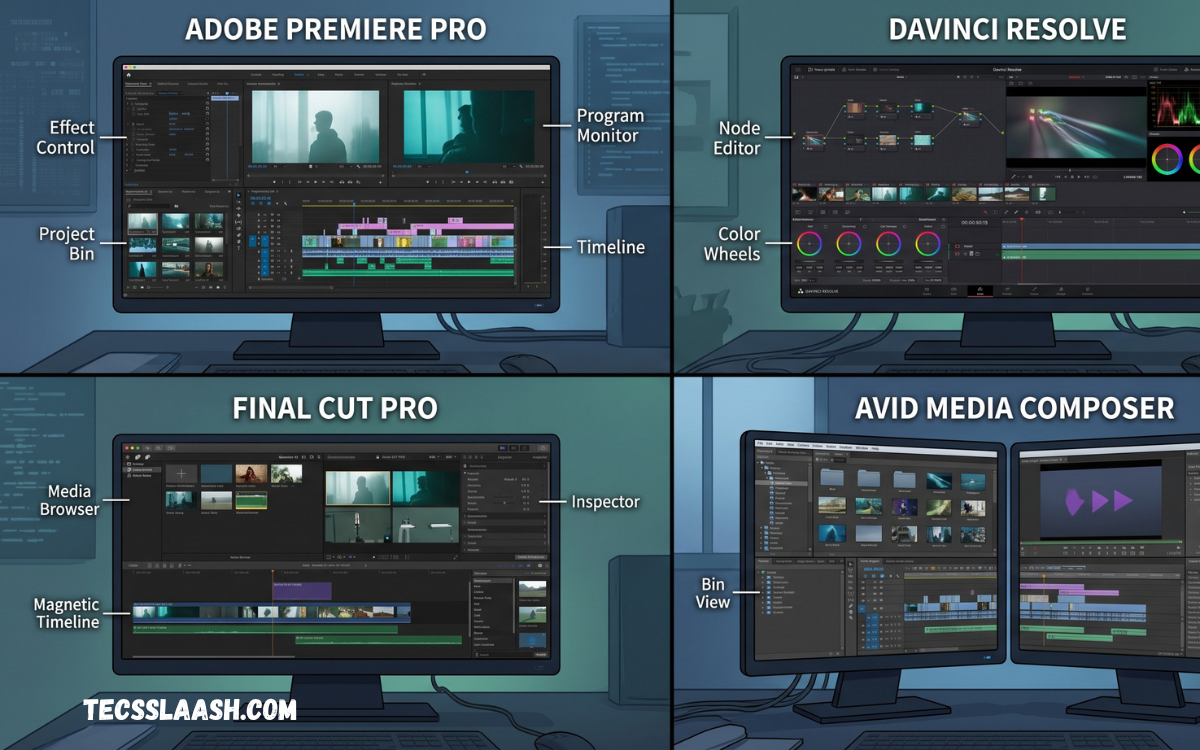
Adobe Premiere Pro is one of the most recognized professional video editing applications available today. It provides an extensive collection of editing tools for working with complex timelines, multiple video tracks, audio layers, transitions, effects, and professional production workflows.
The application is particularly suitable for filmmakers, YouTubers, marketing teams, agencies, and professional editors who need detailed control over their projects. Its flexible timeline and extensive format support make it a strong choice for projects ranging from short social videos to longer professional productions.
Final Cut Pro for Mac Creators
Final Cut Pro is a powerful video editing application designed specifically for Apple users. Its interface combines professional editing capabilities with a streamlined workflow, making it popular among creators who work on Mac computers.
The application offers advanced timeline management, professional effects, color adjustments, audio editing, and efficient media organization. For creators already invested in the Apple ecosystem, Final Cut Pro can provide a fast and dependable environment for producing high-quality video content.
DaVinci Resolve for Advanced Production
DaVinci Resolve has become a popular option for creators who want professional editing, color correction, visual effects, and audio production within a single application. Its strong color grading capabilities are particularly well known among professional video producers.
The application can support everything from simple creator projects to sophisticated productions. Its broad feature set makes it useful for filmmakers, YouTubers, commercial editors, and production teams looking for powerful tools without necessarily relying on multiple separate programs.
CapCut for Social Media Content
CapCut has gained significant popularity among social media creators because of its accessible interface and convenient editing workflow. It is designed to make tasks such as trimming clips, adding text, applying transitions, adjusting audio, and preparing vertical videos relatively straightforward.
For creators producing TikTok videos, Instagram Reels, Shorts, and other short-form content, CapCut can be a practical option. Its emphasis on quick editing makes it especially useful when creators need to publish content frequently while maintaining an attractive visual presentation.
Filmora for Easy Professional Editing
Filmora provides a balance between advanced editing features and ease of use. Its interface is designed to be approachable for beginners while still offering useful tools for creators who want more control over their videos.
The application can be useful for YouTube channels, educational content, promotional videos, presentations, and social media projects. Its effects, transitions, titles, audio tools, and editing features allow creators to produce professional-looking results without an extremely complicated workflow.
Adobe Premiere Rush for Quick Projects
Adobe Premiere Rush is designed for creators who want a simplified editing experience while maintaining access to essential professional tools. It can be particularly useful for people who regularly create content for social platforms and need an efficient way to prepare videos.
The streamlined workflow makes it suitable for short projects, social media posts, promotional clips, and quick content updates. Creators who already use other Adobe products may also appreciate having a simpler editing option for less demanding projects.
InShot for Mobile Content Creation
InShot is a popular mobile editing application that focuses on straightforward video and image editing. It is useful for creators who primarily work from smartphones and need to produce social media content without using desktop software.
Its editing tools can help users crop footage, adjust video dimensions, add music, insert text, apply effects, and prepare content for different platforms. For mobile-first creators, its simple workflow can make everyday editing faster and more convenient.
VN Video Editor for Flexible Editing
VN Video Editor provides a practical editing environment for creators who want more timeline control while working on mobile devices. It supports multiple layers, transitions, text, music, filters, and other editing features that can help creators produce more detailed projects.
The application is suitable for social media creators, vloggers, students, and independent publishers. Its combination of accessibility and timeline-based editing makes it an appealing choice for people who want more flexibility than extremely basic mobile editors provide.
How to Choose the Right Video Editing App
The best application depends on the type of content you create, your technical experience, your device, and the complexity of your projects. A filmmaker may need advanced color grading and multi-track editing, while a social media creator may prioritize speed, templates, vertical formats, and easy publishing.
Budget is another important consideration. Some applications offer free versions with useful features, while others use subscriptions or one-time purchases. Before choosing an editor, consider your long-term requirements rather than selecting an application only because it has the most features.
Important Features for Professional Video Editing
A professional editor should provide accurate trimming, multi-track timelines, audio controls, color correction, transitions, effects, text tools, and flexible export settings. These features give creators control over both the technical and creative aspects of their projects.
File compatibility is also important. A good application should work efficiently with the formats, resolutions, and frame rates used in your workflow. Support for high-resolution footage, external audio, subtitles, and different aspect ratios can be particularly valuable for creators working across multiple platforms.
Video Editing Apps for YouTube Creators
YouTube creators often require editors that can handle longer videos, detailed storytelling, background music, voiceovers, thumbnails, captions, and multiple video layers. Desktop applications such as Premiere Pro, Final Cut Pro, and DaVinci Resolve can provide the level of control needed for more complex YouTube productions.
However, mobile applications can also be useful for creators who publish short videos, vlogs, updates, and Shorts. The best choice depends on whether your channel focuses on detailed long-form productions or fast-paced short-form content.
Video Editing Apps for Social Media
Social media content often requires a faster editing workflow because creators may need to publish frequently. Applications with vertical video support, simple text tools, transitions, music controls, and quick exports can make the process much easier.
Creators should also consider platform-specific aspect ratios and resolutions. Preparing content correctly for Instagram, TikTok, YouTube Shorts, Facebook, and other platforms helps maintain image quality and ensures that important visual elements are not unnecessarily cropped.
Read Also: Best PC Accessories: Complete Guide to Improve Performance, Productivity, and Gaming Experience
Tips for Creating Professional Videos
Good editing begins before the editing application is opened. Organizing footage, naming files properly, selecting the strongest clips, and understanding the intended audience can make the entire process more efficient. A clear structure also helps prevent unnecessary editing.
Consistency is equally important. Use similar fonts, colors, transitions, audio levels, and visual elements throughout a project when appropriate. Professional content does not necessarily require excessive effects; clean cuts, balanced audio, strong storytelling, and clear visuals often produce better results.
Free vs Paid Video Editing Apps
Free video editing applications can be excellent for beginners and creators with straightforward requirements. They can provide essential editing functions without requiring an immediate financial commitment, allowing users to understand their workflow before investing in premium software.
Paid applications generally provide broader professional capabilities, additional controls, expanded formats, and advanced production features. However, paying for software does not automatically make a video professional. The quality of the final product still depends heavily on editing decisions, storytelling, audio, footage, and creative direction.
Best Choice for Different Types of Creators
For professional filmmakers and advanced editors, applications such as Premiere Pro, Final Cut Pro, and DaVinci Resolve are strong options because they provide extensive control over complex projects. They are particularly useful when detailed editing, color work, and audio production are required.
For mobile creators and social media publishers, applications such as CapCut, InShot, and VN Video Editor can offer a faster workflow. Filmora and Premiere Rush can also be useful for creators who want a middle ground between simple editing and more advanced production capabilities.
Improving Your Editing Workflow
A professional workflow should be organized from importing footage to final export. Start by arranging media into logical folders, reviewing clips, creating a rough timeline, refining the edit, balancing audio, adjusting visuals, and completing a final quality check before publishing.
Keyboard shortcuts and reusable project templates can also save considerable time. Once you become familiar with your preferred application, learning its shortcuts and workflow features can reduce repetitive tasks and allow you to spend more time on storytelling and creative decisions.
Frequently Asked Questions
What is the best video editing app for professional content creation?
Adobe Premiere Pro, Final Cut Pro, and DaVinci Resolve are among the strongest choices for advanced professional editing. The best option depends on your device, workflow, experience, and project requirements.
Is DaVinci Resolve good for professional video editing?
Yes. DaVinci Resolve provides professional editing, color correction, visual effects, and audio production features. It can be suitable for both independent creators and professional production workflows.
Is Final Cut Pro good for YouTube videos?
Yes. Final Cut Pro provides powerful timeline editing, audio tools, effects, color controls, and media organization features that can work well for both short and long-form YouTube content.
Which video editing app is best for beginners?
Filmora, CapCut, InShot, and VN Video Editor are relatively accessible options for beginners. Your choice should depend on whether you prefer editing on a computer or mobile device.
What is the best app for editing social media videos?
CapCut, InShot, and VN Video Editor are useful choices for social media content. They support common short-form workflows and can make it easier to prepare videos for vertical platforms.
Can free video editing apps create professional videos?
Yes. Free applications can produce high-quality videos when used correctly. Professional results depend more on footage, editing technique, storytelling, audio quality, and creative decisions than software price.
Which video editor is best for Mac users?
Final Cut Pro is a strong option for Mac users, while DaVinci Resolve and Adobe Premiere Pro are also available for macOS. The best choice depends on your preferred workflow and editing requirements.
Which video editor is best for YouTube creators?
There is no single answer for every YouTube creator. Premiere Pro, Final Cut Pro, DaVinci Resolve, Filmora, and other applications can all work well depending on video length, editing complexity, and publishing requirements.
What features should a professional video editor have?
Important features include multi-track editing, accurate trimming, audio controls, color correction, effects, transitions, subtitles, flexible export settings, and support for different video formats and resolutions.
Should I use mobile or desktop video editing software?
Mobile editing is convenient for quick social media content, while desktop software generally provides greater control for complex projects. Choose the platform that matches your content style, workflow, and production requirements.
Conclusion
The Best Video Editing Apps for Professional Content Creation are not necessarily the same for every creator. Premiere Pro, Final Cut Pro, DaVinci Resolve, CapCut, Filmora, Premiere Rush, InShot, and VN Video Editor each serve different needs, workflows, devices, and experience levels.
The right choice should be based on your content goals, editing requirements, budget, and preferred workflow.

