


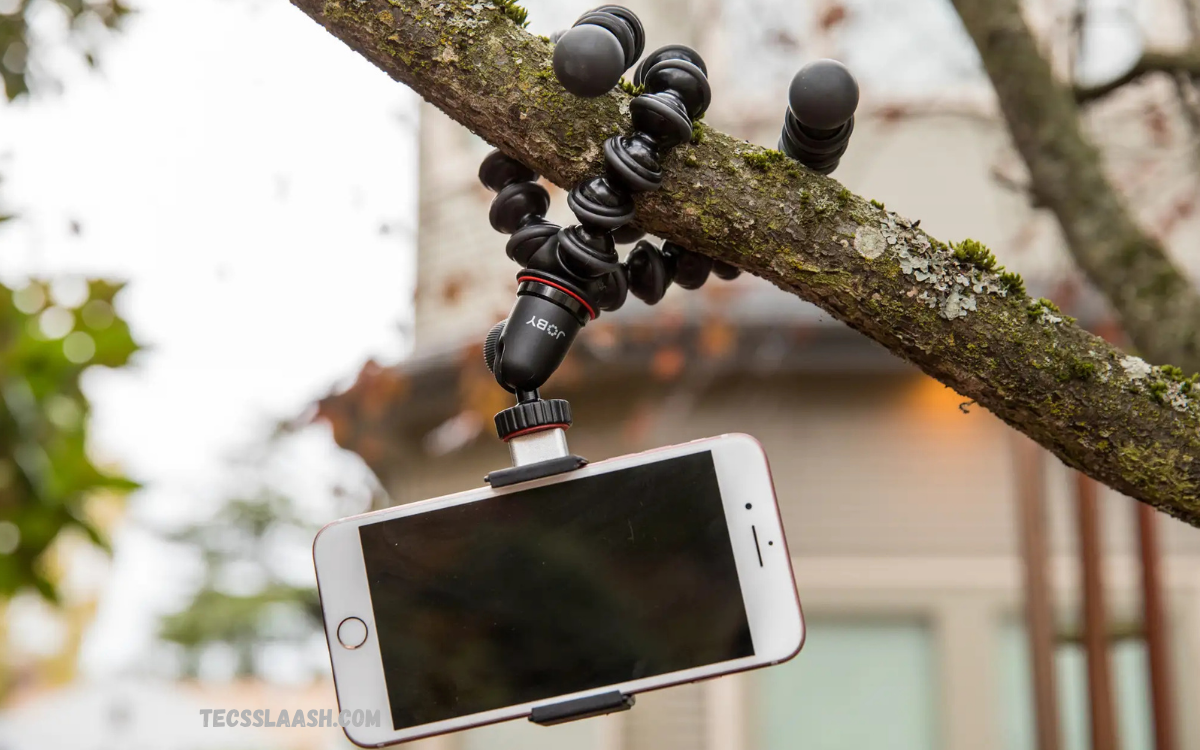
Mobile photography has advanced rapidly, yet even excellent smartphone cameras cannot completely compensate for shaky hands, poor framing, or unstable shooting positions. The Best Tripod for Mobile provides a reliable platform for photos, videos, livestreams, time-lapses, group portraits, and professional content creation.
Choosing the right tripod depends on shooting style, required height, portability, phone compatibility, and stability. Current buying guides highlight flexible models, compact tabletop options, extendable selfie-tripod designs, and dedicated full-size supports as strong choices for different smartphone users.
Why You Need the Best Tripod for Mobile
A quality mobile tripod keeps your smartphone steady during photography and video recording. Stable support becomes especially valuable during long exposures, low-light photography, time-lapse recording, interviews, tutorials, and videos requiring consistent framing without hand movement.
The right tripod also gives you greater creative control. You can position the phone at eye level, near ground level, above a subject, or at unusual angles. This flexibility helps produce cleaner compositions while allowing hands-free recording for creators, professionals, students, and everyday users.
Best Tripod for Mobile for Photography
Mobile photography benefits significantly from stable support because smartphone cameras often use slower shutter speeds in difficult lighting. A tripod reduces physical movement and helps capture sharper night scenes, landscapes, architectural photographs, and detailed close-up images.
For photography, prioritize a strong phone clamp, secure leg locks, adjustable angles, and reliable balance. Compact tabletop models work well for controlled spaces, while taller tripods provide greater flexibility for outdoor portraits, group photographs, and full-body compositions.
Best Tripod for Mobile for Video Recording
Video recording demands stability because every small movement becomes visible during playback. A good tripod keeps framing consistent, making videos appear more professional for YouTube, social media, online courses, product demonstrations, and business presentations.
Look for smooth adjustment controls and a stable head when selecting a mobile video tripod. If you frequently change between portrait and landscape recording, choose a mount allowing fast orientation changes without repeatedly adjusting the entire tripod.
Best Tripod for Mobile for Vlogging
Vloggers need a tripod that balances portability with versatility. Flexible legs can attach to railings, poles, branches, and other secure surfaces, while extendable selfie-tripod designs help creators capture wider scenes and record themselves from comfortable distances.
Accessory compatibility can also improve a vlogging setup. Some mobile tripods provide mounting points for lights, microphones, and additional equipment, making them useful for creators who want a compact production setup rather than carrying several separate supports.
Best Tripod for Mobile for Travel
Travelers usually need lightweight equipment that fits easily inside a backpack or carry-on bag. A large, heavy tripod may provide excellent stability but becomes inconvenient when walking through airports, cities, hiking trails, or tourist destinations.
A travel-friendly mobile tripod should offer a practical balance between folded size, weight, maximum height, and strength. Recent smartphone tripod guides identify compact selfie-tripod designs and lightweight tabletop options as useful choices for users wanting dependable support without excessive bulk.
Best Tripod for Mobile for Selfies
A tripod improves selfies by allowing greater distance between the photographer and the camera. Instead of holding the phone close to your face, you can position it farther away and capture more natural proportions, wider backgrounds, and better group compositions.
Bluetooth remotes are useful for this purpose because they allow hands-free shutter control from a short distance. Before buying, check remote compatibility, battery availability, connection reliability, and whether the tripod remains stable when fully extended.
Best Tripod for Mobile for Live Streaming
Live streaming requires consistent framing for extended periods, making stability one of the most important requirements. A weak tripod can shift, vibrate, or slowly lose position, creating an unprofessional viewing experience during broadcasts.
Choose a tripod with a dependable locking system and enough height for your preferred streaming setup. Desktop creators may prefer compact stands, while standing presenters often need taller tripods capable of positioning the phone close to eye level.
Best Tripod for Mobile for Video Calls
Video calls become more comfortable when the smartphone remains at a suitable height. Holding a phone throughout a long meeting causes fatigue, while placing it on an unsuitable surface can create poor camera angles and distracting movement.
A small desktop tripod is often enough for meetings, online classes, virtual interviews, and remote work. Adjustable positioning is important because the camera should ideally face you directly rather than shooting dramatically upward or downward.
Different Types of Mobile Tripods
Mobile tripods are available in several designs, and each type serves a different purpose. The most common categories include mini tripods, flexible tripods, full-size tripods, selfie stick tripods, and tabletop stands with integrated phone holders.
Understanding these categories makes buying easier because there is no single perfect design for everyone. Your ideal option depends on whether you prioritize portability, maximum height, creative positioning, professional stability, or simple everyday convenience.
Mini Tripods for Mobile
Mini tripods are compact supports designed for desks, tables, shelves, and low-level photography. They are easy to carry and set up quickly, making them useful for video calls, product photography, livestreaming, and indoor content creation.
Their main limitation is height. A mini tripod cannot normally replace a full-size standing model, but its compact design makes it extremely practical when working close to a stable surface. Current guides continue to recommend compact models such as the Manfrotto PIXI-style design for tabletop use.
Flexible Tripods for Mobile
Flexible tripods use bendable legs that can wrap around suitable objects or adapt to uneven surfaces. This design creates shooting opportunities unavailable with standard straight-leg tripods, especially during travel, outdoor filming, and creative photography.
However, flexible legs should still provide enough strength for your phone and accessories. Check the construction quality and weight capacity carefully, particularly when adding microphones, lights, external lenses, or other equipment to the setup.
Full-Size Tripods for Mobile
Full-size tripods provide greater height and usually offer better stability than compact models. They are suitable for standing videos, full-body photographs, professional presentations, tutorials, fitness content, and situations requiring consistent eye-level framing.
A dedicated phone clamp can turn many traditional camera tripods into effective smartphone supports. This approach can be especially useful if you already own a quality tripod and simply need a secure adapter for your mobile device.
Selfie Stick Tripods for Mobile
Selfie stick tripods combine two useful tools into one portable design. You can hold the device for walking shots and quickly unfold the base when you need hands-free photographs, videos, or group images.
These models are convenient for travel and casual content creation, although maximum stability can vary at full extension. Select a model with a strong base, reliable extension mechanism, and secure clamp rather than focusing only on maximum advertised height.
Tabletop Tripods for Mobile
Tabletop tripods provide a stable solution for creators working from desks or other flat surfaces. They are particularly useful for podcasts, product demonstrations, unboxing videos, tutorials, online teaching, and video conferencing.
Because the center of gravity remains low, a well-built tabletop tripod can provide excellent stability despite its small size. Ball-head adjustment also allows quick movement between portrait and landscape orientation for different recording formats.
How to Choose the Best Tripod for Mobile
The best purchasing decision begins with identifying how you plan to use the tripod. Someone recording travel videos has different requirements from a creator filming tutorials at home or a photographer capturing night landscapes.
Focus on practical specifications rather than marketing claims. Stability, clamp quality, usable height, folded size, build material, adjustment speed, and compatibility usually matter more than having a long list of unnecessary features.
Check Mobile Phone Compatibility
Modern smartphones vary considerably in width, thickness, weight, and camera placement. Large devices, protective cases, and foldable phones may require wider clamps, so never assume that every universal holder fits every phone perfectly.
The clamp should hold the device securely without pressing important buttons or damaging the phone. Guides for current mobile tripod selection also emphasize secure gripping and compatibility as essential factors, especially with larger modern smartphones.
Consider Tripod Stability
Stability should always be a major priority because an unstable tripod can ruin footage and potentially damage your smartphone. Wide leg placement, quality materials, secure locks, and balanced construction all contribute to safer performance.
Test stability conceptually at the height you actually expect to use. A tripod may feel strong when collapsed but become less stable when fully extended, particularly outdoors where wind and uneven surfaces create additional challenges.
Choose the Right Maximum Height
Maximum height affects both framing and comfort. Short tripods work well for desktop recording, but standing videos and full-body content generally require taller support to avoid awkward low-angle compositions.
Do not choose height alone, however. A very tall tripod with weak construction can be less useful than a slightly shorter model with excellent rigidity. Consider usable stability at maximum extension before making a final decision.
Check Folded Size and Weight
Portability matters because equipment that feels inconvenient often remains unused. If you travel frequently or create content outdoors, choose a tripod that fits comfortably inside your normal bag without adding unnecessary weight.
For home studios, portability may be less important than stability and height. In that situation, a larger aluminum tripod may provide better long-term performance than an ultra-light compact model designed primarily for occasional travel.
Look at Build Materials
Aluminum generally provides a strong balance between durability, stability, and price. High-quality plastic components can reduce weight, but weak plastic joints may become a problem when frequently opened, folded, or used outdoors.
Premium materials can further reduce weight while maintaining rigidity, although smartphone users often do not need expensive professional camera-tripod construction. Select material according to expected usage rather than paying extra for specifications you will rarely use.
Examine the Phone Clamp Quality
The phone clamp is one of the most important parts of the entire setup. Even excellent tripod legs cannot protect your smartphone if the holder slips, loses tension, or fails to grip the device properly.
Look for padded contact areas and secure adjustment. A good clamp should hold the phone firmly in both portrait and landscape positions while allowing reasonable access to buttons, charging ports, and cameras.
Portrait and Landscape Support
Social platforms frequently favor vertical video, while YouTube and many traditional productions use horizontal framing. The best mobile tripod should make switching between these orientations quick and reliable.
A ball head or adjustable clamp can simplify repositioning. Check whether orientation changes remain secure because some low-cost mounts become loose after repeated movement or struggle to maintain position under the phone’s weight.
Bluetooth Remote Features
A Bluetooth remote adds convenience for selfies, group photographs, and solo content creation. It allows you to trigger the camera without touching the phone, reducing movement at the moment of capture.
Remote quality varies, so consider it a useful feature rather than the only reason to buy a tripod. A stable tripod with a dependable clamp is more valuable than an unstable model containing many accessories.
Tripod Load Capacity
Even though smartphones are lighter than cameras, load capacity still matters when using accessories. A phone, clamp, microphone, light, and external lens can create significantly more stress than the phone alone.
Choose a tripod with comfortable capacity beyond your expected setup weight. Extra capacity provides a safety margin and can reduce flexing when the device is positioned at higher angles or maximum extension.
Best Tripod for Mobile Photography at Night
Night photography benefits greatly from stable support because smartphones often use longer exposures in darker conditions. Holding the phone by hand can introduce motion, reducing sharpness and making details appear softer.
A tripod allows you to experiment with city lights, light trails, night landscapes, and creative long-exposure effects. Use a timer or remote shutter to minimize contact with the phone during image capture.
Best Tripod for Mobile Time-Lapse Videos
Time-lapse recording can last several minutes or several hours, making a dependable tripod essential. Any movement during recording can change framing and reduce the smooth visual effect created by the final sequence.
Select a stable location and ensure the tripod cannot be easily bumped. Battery capacity, storage space, weather conditions, and phone temperature should also be considered before starting long time-lapse projects.
Best Tripod for Mobile Content Creators
Content creators often need more versatility than casual users. A suitable setup may require quick orientation changes, accessory mounts, sufficient height, stable construction, and easy portability for recording in different locations.
Recent 2026 buying guides highlight different solutions for different creator needs, including flexible vlogging tripods, tall selfie-tripod designs, and compact tabletop models. There is no universal winner because the best choice depends heavily on shooting style.
Read Also: AI-Powered Software and Smart Productivity Features
Best Tripod for Mobile and Ring Light Setup
Ring lights are popular for beauty videos, tutorials, livestreaming, and product content. If the phone mounts inside or near the lighting setup, the support system must remain balanced and secure.
Check the total weight and mounting design before attaching accessories. A tripod that works perfectly with a phone alone may become unstable after adding a large light, microphone, or other equipment above the center point.
Best Tripod for Mobile Beginners
Beginners should avoid making the buying process unnecessarily complicated. Start by identifying your primary purpose, such as selfies, travel videos, video calls, product content, or photography.
A versatile model with a secure clamp, reasonable height, reliable stability, and simple controls is usually a better choice than an advanced tripod filled with features you may never need or understand.
Common Mistakes When Buying a Mobile Tripod
One common mistake is choosing the cheapest available option without checking construction quality. Low prices can be attractive, but weak joints, poor clamps, and unstable bases may quickly create frustration.
Another mistake is buying an extremely tall tripod without considering portability and rigidity. Always evaluate the complete design, including maximum height, folded length, weight, leg strength, and stability under real shooting conditions.
How to Set Up a Mobile Tripod Correctly
Begin by placing the tripod on a stable surface and extending the legs evenly. If the ground is uneven, adjust the legs carefully instead of forcing the phone into position using the tripod head alone.
Secure the phone firmly inside the clamp and check its balance before stepping away. Make sure all locks are tightened, especially when using portrait orientation or positioning the phone at an angle.
How to Improve Mobile Videos Using a Tripod
A tripod improves videos most effectively when combined with thoughtful composition. Position the camera at an appropriate height, leave enough space around the subject, and avoid distracting backgrounds whenever possible.
Lighting and audio also influence professional quality. Once camera stability is solved, focus on clear lighting, understandable sound, accurate focus, and intentional framing rather than relying only on expensive equipment.
How to Maintain Your Mobile Tripod
Regular cleaning helps prevent dirt from affecting leg locks, hinges, and clamps. After outdoor use, remove dust, sand, or moisture before folding the tripod and storing it in a dry location.
Avoid forcing stuck sections or overtightening adjustment knobs. Treat moving parts carefully, inspect the phone clamp periodically, and replace worn components before they create a risk of dropping your smartphone.
Is an Expensive Mobile Tripod Worth It?
An expensive tripod can be worthwhile for professionals who use it frequently and depend on reliable performance. Better construction, stronger components, smoother adjustments, and longer durability can justify additional investment.
Casual users may not need premium equipment. A moderately priced tripod with excellent stability and compatibility can provide everything necessary for family photographs, travel, video calls, and occasional content creation.
Frequently Asked Questions
What is the best tripod for mobile phones?
The best tripod for mobile phones depends on stability, height, portability, phone compatibility, and your recording requirements.
Can I use any tripod with my smartphone?
Most tripods can support smartphones when used with a secure and compatible mobile phone holder.
Which tripod is best for mobile video recording?
A stable tripod with adjustable height, strong legs, and flexible angle adjustment works best for mobile video recording.
What tripod height is best for mobile?
Tall tripods suit standing videos, while compact tripods are better for desktop recording, selfies, and close-up photography.
Is a Bluetooth remote useful with a mobile tripod?
Yes, a Bluetooth remote allows easier photo and video capture without touching the smartphone during recording.
Are lightweight mobile tripods stable?
A high-quality lightweight tripod can provide excellent stability when it has strong materials, secure locks, and a wide base.
Can I use a mobile tripod for YouTube and TikTok videos?
Yes, mobile tripods are useful for YouTube videos, TikTok content, Instagram Reels, vlogging, tutorials, and live streaming.
What should I check before buying the best tripod for mobile?
Check build quality, maximum height, portability, phone clamp strength, stability, weight capacity, and adjustment options.
Can a mobile tripod hold both iPhone and Android phones?
Most universal mobile tripods support both iPhone and Android devices, but phone clamp compatibility should always be checked.
Is a mini tripod better than a tall tripod for mobile?
Mini tripods are ideal for travel and desktop use, while tall tripods work better for full-body videos and standing content.
Conclusion
The Best Tripod for Mobile is the one that matches your actual shooting requirements, rather than simply the one with the highest price or tallest design. Think carefully about where you record, how often you travel, and whether you need maximum portability or stronger professional support.
Prioritize a secure phone clamp, stable construction, practical height, and easy adjustment. Whether you choose a compact tabletop tripod, a flexible model, a full-size stand, or a selfie stick tripod, the right support can significantly improve smartphone photography and video results.

