


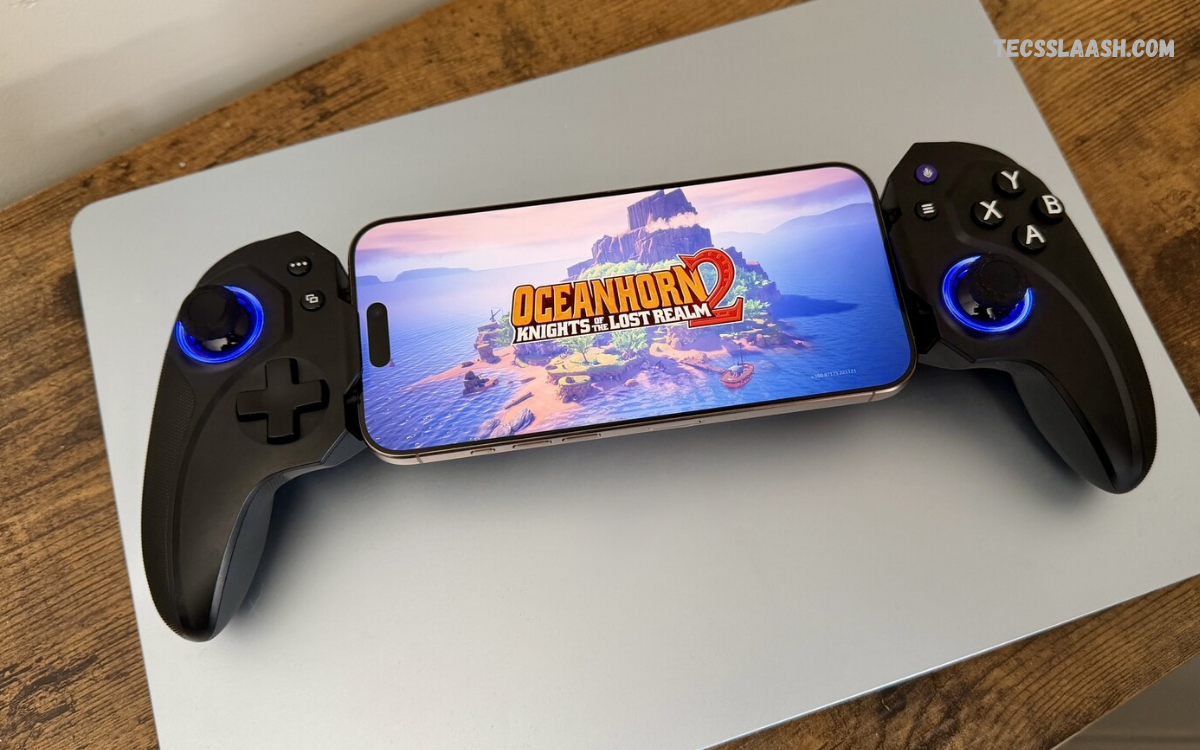
Finding the Best Gaming Controller for Mobile can significantly improve the way you play games on Android and iPhone devices. A dedicated controller provides physical buttons, responsive triggers, precise thumbsticks, and a more comfortable gaming experience than touchscreen controls.
Mobile gaming has evolved beyond simple casual games, with many titles now offering console-style gameplay, cloud gaming, and remote-play support. Modern controllers can make racing, action, adventure, sports, and multiplayer games easier to control while giving players a more familiar console-like experience.
What Is the Best Gaming Controller for Mobile?
The best mobile gaming controller depends on your phone, preferred games, connection type, budget, and comfort requirements. Current 2026 recommendations include options such as the Backbone One, GameSir G8 Galileo, Razer Kishi V3 Pro, and other dedicated mobile controllers.
For most players, a telescopic controller that connects directly to the smartphone is a convenient choice because it combines the phone and controller into one portable gaming device. Wired USB-C controllers can also provide responsive input without depending on Bluetooth connectivity.
Backbone One
The Backbone One remains one of the most popular choices for mobile gaming because of its compact design, responsive controls, and broad compatibility. WIRED currently lists the Backbone One as its top mobile gaming controller, highlighting its comfortable design, responsive buttons, pass-through charging, and additional features through its companion software.
Its telescopic design allows a compatible phone to sit between the two controller grips, creating a handheld-console-style setup. The controller is particularly attractive for players who want portability without carrying a separate phone stand and traditional gamepad.
GameSir G8 Galileo
The GameSir G8 Galileo is an excellent choice for gamers who prefer a larger, more traditional controller shape. It features Hall-effect sticks and triggers, back controls, mappable buttons, pass-through charging, and a 3.5mm audio connection.
Its USB-C connection makes it particularly suitable for compatible Android phones and USB-C iPhones because the controller connects directly to the device. The larger grips can also provide additional comfort during longer gaming sessions compared with smaller telescopic controllers.
Razer Kishi V3 Pro
The Razer Kishi V3 Pro targets players who want a premium mobile gaming experience with a controller that feels closer to a full-size console gamepad. TechRadar currently places the Kishi V3 Pro among its premium mobile-controller recommendations, emphasizing its comfort and features.
The larger design can be especially useful for players who find compact controllers uncomfortable. The main consideration is its higher price and greater size, so it makes more sense for dedicated gamers than occasional mobile players.
GameSir X2 Series
GameSir’s X2 controllers are worth considering when affordability and portability are important. The X2 family has appeared among 2026 mobile-controller recommendations as a budget-friendly option for gamers who want physical controls without moving into premium pricing.
A compact controller can be easier to carry in a backpack or gaming setup, making it practical for travel and everyday use. Before purchasing, check the exact X2 model’s compatibility because different versions can support different phones and connection standards.
ROG Tessen
The ASUS ROG Tessen is another strong option for competitive mobile gaming, particularly for players who want responsive physical controls and a design focused on portability. TechRadar specifically highlights the controller as a strong option for Call of Duty: Mobile because of its responsive button inputs.
Its folding design can make transportation easier than some larger controllers. If portability is a major priority, this type of design can provide a useful balance between a dedicated mobile controller and a traditional wireless gamepad.
Why Use a Mobile Gaming Controller?
Touchscreen controls are convenient, but physical buttons can provide more consistent input during demanding gameplay. Analog sticks, triggers, and tactile buttons can make movement, aiming, acceleration, braking, and other actions feel more natural.
A controller can also reduce the need to place fingers directly over parts of the display. This leaves more of the screen visible while playing compatible games and can make the interface easier to manage.
Wired vs Bluetooth Mobile Controllers
Wired controllers connect directly to a compatible phone through USB-C or another supported connector. This approach can offer highly responsive input and eliminates the need to manage controller battery charging.
Bluetooth controllers provide greater flexibility because the controller can work separately from the smartphone. They can be useful for cloud gaming, tablets, computers, smart TVs, and other compatible devices, although wireless performance depends on the controller and connection environment.
Hall-Effect and TMR Joysticks
Joystick technology is an important consideration when choosing the Best Gaming Controller for Mobile. Hall-effect sticks use magnetic sensing rather than traditional physical contact mechanisms, which can help reduce the mechanical wear associated with conventional joystick designs.
TMR technology is another magnetic sensing approach appearing in newer premium controllers. For buyers comparing modern controllers, drift resistance, stick precision, calibration options, and long-term reliability can be more important than simply choosing the newest model.
Compatibility Matters
Always check whether a controller supports your specific smartphone before buying. Android and iPhone compatibility can differ depending on the connector, operating system, phone dimensions, and controller software.
Phone cases can also affect compatibility with telescopic controllers. A thick protective case may prevent the controller from connecting correctly, so checking the manufacturer’s supported dimensions and case requirements is an important step.
Best Controller for Competitive Gaming
Competitive players should prioritize responsive controls, comfortable grips, accurate thumbsticks, and reliable connections. A wired controller can be particularly appealing when minimizing controller-side wireless variables is important.
For competitive mobile titles, back buttons or paddles can also provide additional control options. However, game-specific controller support and competitive rules should always be checked because not every mobile game treats external controllers in the same way.
Read Also: Best iPhone Accessories: Essential Picks for Better Everyday Use
Best Controller for Cloud Gaming
Cloud gaming expands the usefulness of a mobile controller because a smartphone can become a portable screen for supported streaming services. A comfortable controller with responsive controls can make streamed console and PC games feel more natural on a phone.
For cloud gaming, remember that controller quality is only one part of overall responsiveness. Internet connection quality, network latency, server distance, and streaming performance can have a larger effect on the gaming experience.
Best Controller for Casual Players
Casual gamers do not necessarily need an expensive premium controller. A compact and affordable model with comfortable buttons, reliable compatibility, and a simple connection method can provide everything required for occasional gaming.
The GameSir X2 series and Backbone One are examples of different approaches to portable mobile gaming. Your ideal choice should depend on how frequently you play and whether portability, comfort, or advanced controls matters most.
How to Choose the Best Gaming Controller for Mobile
Start by checking your smartphone’s operating system and connector. After compatibility, consider controller size, button layout, joystick technology, connection method, phone-case support, and whether you need additional buttons.
Your gaming habits should determine the final choice. Competitive players may prefer advanced controls, while casual gamers may benefit more from portability and affordability, and cloud gamers may prefer a versatile controller that can connect to multiple devices.
Controller Comfort and Ergonomics
Comfort becomes increasingly important during long gaming sessions. A controller with appropriately sized grips, well-positioned thumbsticks, responsive buttons, and comfortable triggers can reduce the need to constantly adjust your hand position.
Large controllers can provide a more console-like grip, while smaller models are easier to transport. Try to balance portability with comfort instead of selecting a controller based only on its specifications.
Do Mobile Controllers Improve Gaming Performance?
A controller can improve control precision in games that properly support external input. Physical sticks and buttons can offer more tactile feedback than touchscreen controls, especially in games involving movement, aiming, racing, or complex combinations.
However, a controller does not automatically make someone a better player. Skill, game knowledge, practice, connection quality, and the game’s controller implementation remain important factors.
Frequently Asked Questions
What is the Best Gaming Controller for Mobile?
The best choice depends on your requirements, but the Backbone One, GameSir G8 Galileo, and Razer Kishi V3 Pro are among the notable 2026 options.
Is a Mobile Controller Better Than Touch Controls?
A controller can provide more precise physical input and a more console-like experience in compatible games. Touch controls remain convenient for games designed primarily around touchscreen interaction.
Are Mobile Controllers Compatible With Android?
Many mobile controllers support Android devices, but compatibility varies by model. Always verify the controller’s supported operating systems, connector type, and phone dimensions before purchasing.
Can I Use a Controller With an iPhone?
Yes, compatible controllers can work with iPhones, particularly newer USB-C models and supported Bluetooth controllers. Compatibility depends on the controller, iPhone model, operating system, and individual game.
Are Wired Controllers Better for Mobile Gaming?
Wired controllers can provide direct connectivity and avoid Bluetooth pairing or battery concerns. They are a strong option when responsiveness and simplicity are more important than wireless flexibility.
Do All Mobile Games Support Controllers?
No, controller support varies between games. Check the game’s official compatibility information before buying a controller specifically for a particular title.
What Should I Check Before Buying a Mobile Controller?
Check smartphone compatibility, connector type, phone dimensions, case compatibility, button layout, joystick technology, comfort, connection method, and supported games.
Is a Premium Mobile Controller Worth It?
A premium controller can be worthwhile for frequent gamers who value comfort, advanced controls, and additional features. Casual players may receive better value from a simpler, less expensive model.
Conclusion
The Best Gaming Controller for Mobile depends on individual requirements, but several 2026 models stand out across different categories. The Backbone One is a strong all-round choice, while the GameSir G8 Galileo offers a larger console-style design and Hall-effect controls.
For premium users, the Razer Kishi V3 Pro is worth considering because of its larger design and advanced feature set. Budget-conscious players can explore GameSir’s more affordable models, while portability-focused gamers may prefer a compact or folding controller.

