


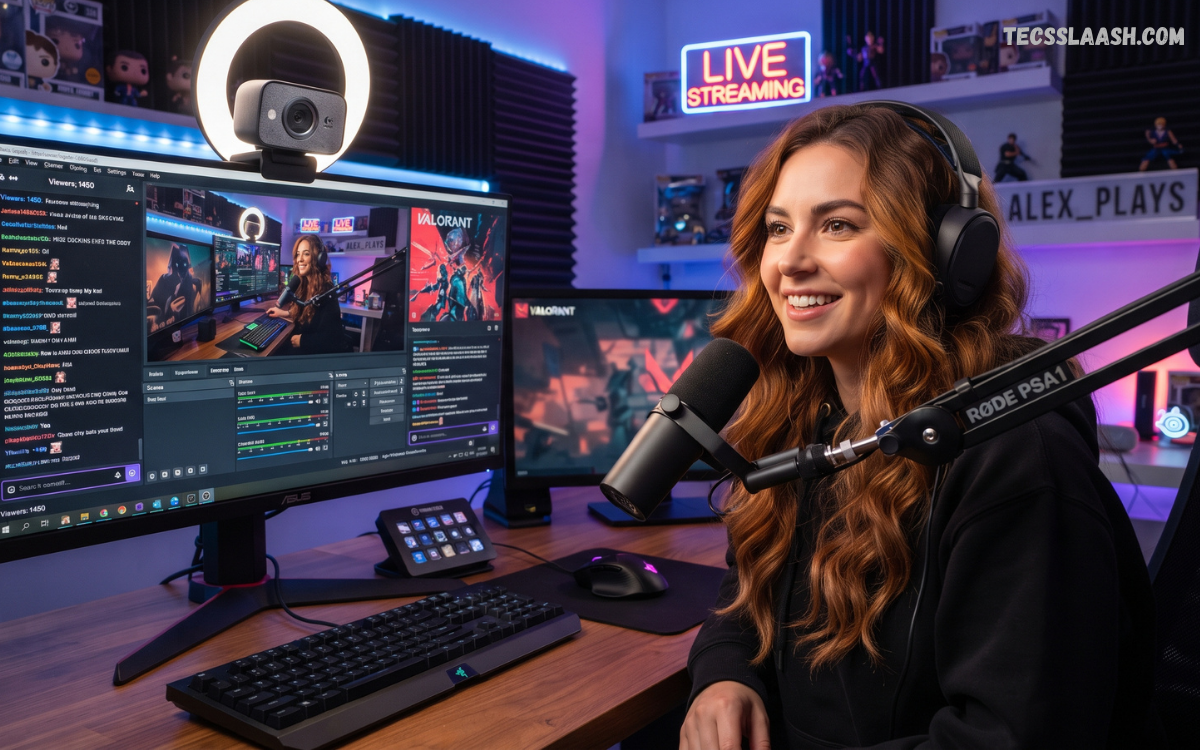
Streaming has evolved from a hobby into a serious content-creation industry. Whether you stream gaming sessions on Twitch, create YouTube videos, host live events, or build a professional online brand, video quality has a direct effect on how viewers perceive your content.
Choosing the best webcam for streaming requires more than selecting the camera with the highest resolution printed on its box. A 4K webcam can produce excellent footage, but sensor quality, lens performance, lighting, autofocus, image processing, and frame rate can matter just as much. A well-balanced 1080p webcam can outperform a poorly designed 4K model in a difficult room.
What Makes the Best Webcam for Streaming?
The best webcam for streaming should offer excellent image quality, reliable autofocus, accurate exposure, smooth frame rates, and strong compatibility with streaming software. A webcam should also maintain consistent image quality when lighting conditions change.
Modern webcams offer significantly more flexibility than basic computer cameras. Some models provide 4K capture, HDR, AI framing, advanced autofocus, hardware-based pan and tilt, and sophisticated software controls.
Why Webcam Quality Matters for Streaming
Your webcam is one of the most visible components of a live stream. Viewers may forgive average gameplay quality or simple overlays, but a blurry, noisy, poorly exposed face camera can make an otherwise professional broadcast appear unfinished. Clear facial detail creates a stronger visual connection between the streamer and audience, particularly during commentary, reactions, tutorials, podcasts, and live discussions.
A dedicated webcam also provides greater control over composition. You can position the camera above or below a monitor, adjust the field of view, control exposure, select white balance settings, and create a more consistent visual presentation. For creators building a recognizable brand, consistent camera quality can become an important part of the overall production style.
1080p vs 1440p vs 4K Webcams
1080p remains a practical resolution for many streamers because it provides sharp Full HD video without requiring excessive bandwidth or processing power. A quality 1080p webcam running at 60 frames per second can be particularly attractive for gaming streams where smooth motion is more important than maximum resolution. Several current webcam recommendations still include 1080p models as strong choices for beginners and value-focused creators.
4K webcams provide four times the pixel count of 1080p, giving creators additional flexibility for cropping, reframing, recording, and producing higher-resolution content. Even when a streaming platform ultimately delivers a 1080p stream, starting with a higher-resolution source can provide additional detail and editing flexibility. However, 4K should not automatically be treated as superior because sensor size, lens quality, lighting, and image processing remain critical factors.
Frame Rate and Smooth Motion
Frame rate determines how smoothly movement appears on screen. A webcam capable of 60 frames per second can provide noticeably smoother motion than a 30fps camera, particularly during gaming streams, energetic commentary, demonstrations, and fast hand movements. For a streamer who frequently moves around the frame, higher frame rates can make the presentation feel more responsive.
However, 60fps is not mandatory for every creator. A talking-head streamer who remains relatively stationary may receive greater benefits from a better sensor, improved low-light performance, or a high-quality lens. The right balance depends on the type of content being produced and the capabilities of the streaming computer.
Autofocus Performance
Autofocus is another major consideration when selecting the Best Webcam for Streaming. A reliable autofocus system keeps the subject sharp when moving closer to or farther away from the camera. This becomes especially useful for product demonstrations, tutorials, unboxing videos, cooking streams, educational content, and creators who frequently change positions.
Poor autofocus can become distracting when the camera repeatedly searches for focus during a live broadcast. Some webcams use advanced autofocus systems designed to recognize faces and maintain focus more effectively. Fixed-focus webcams can also work extremely well when the streamer remains at a consistent distance from the camera.
Low-Light Performance
Lighting has a greater influence on webcam quality than many new streamers realize. A camera with excellent specifications can still produce noisy, muddy footage when used in a dark room. Low-light performance depends heavily on sensor size, lens aperture, image processing, and exposure algorithms.
The Best Webcam for Streaming should produce a clean image under realistic indoor lighting. Current webcam comparisons frequently identify low-light handling as a major differentiating factor, with models such as the Razer Kiyo Pro Ultra receiving attention for performance in darker environments.
Field of View
Field of view, commonly abbreviated as FOV, determines how much of your surroundings appear in the frame. A narrow field of view focuses attention on your face, while a wider FOV can show your desk, gaming setup, instruments, products, or background decorations.
For traditional face-cam streaming, a moderate FOV is often the easiest option. Extremely wide lenses can make facial features appear distorted when the camera is positioned close to the subject. Creators who demonstrate products or move around their workspace may benefit from a wider field of view.
Best Webcam for Streaming: Logitech Options
Logitech has remained a major name in the webcam market because its cameras combine broad software compatibility with straightforward setup. Models such as the Logitech C920 remain popular value choices, while newer 4K models provide substantially higher image quality and additional controls.
The Logitech MX Brio is particularly relevant for creators who want a flexible 4K webcam for streaming, video calls, and content creation. Current guides highlight its 4K capture, autofocus, low-light capabilities, and broader feature set as reasons to consider it for higher-end setups.
Best Webcam for Streaming: Elgato Facecam
Elgato has developed a strong reputation among content creators because its hardware and software are designed around streaming workflows. Facecam models emphasize image quality, manual controls, and integration with creator-focused production environments.
The Elgato Facecam family is particularly suitable for streamers who already use dedicated microphones, lighting equipment, capture hardware, and OBS-based production. Current 2026 guides identify Elgato models among the strongest options for creators seeking high-quality video and streaming-oriented controls.
Best Webcam for Streaming: Razer Kiyo Pro Ultra
The Razer Kiyo Pro Ultra is an appealing choice for streamers who prioritize image quality in challenging lighting. Its large Sony STARVIS sensor is frequently highlighted as one of its major strengths, particularly for low-light streaming environments.
This type of webcam makes sense for creators who cannot maintain studio-quality lighting throughout every broadcast. A larger sensor can capture more usable light, allowing the camera to maintain cleaner footage when room illumination is limited. It remains a premium option, so budget-conscious beginners may find better value elsewhere.
Best Webcam for Streaming: Insta360 Link Series
The Insta360 Link series is different from conventional fixed webcams because it uses mechanical gimbal movement and intelligent tracking. Instead of simply cropping the image digitally, the camera can physically adjust its orientation to follow the presenter.
This makes the Insta360 Link family especially useful for educators, presenters, fitness creators, product demonstrators, and streamers who move around their workspace. Current webcam comparisons identify the Link 2 as a strong option for active creators who want 4K video and hardware-based tracking.
Best Webcam for Streaming: OBSBOT Tiny Series
OBSBOT Tiny webcams are designed around intelligent tracking and automated framing. Their PTZ-style design allows the camera to pan and tilt as the subject moves, making them useful for presentations and creators who do not remain in a fixed position.
For a traditional gaming streamer who sits in front of a monitor, mechanical tracking may not be essential. For teachers, presenters, coaches, fitness creators, and demonstrators, however, it can provide a substantial production advantage. Current webcam guides continue to identify OBSBOT models as useful choices for tracking-focused applications.
Best Budget Webcam for Streaming
Beginners do not necessarily need to spend hundreds of dollars on a webcam. A reliable 1080p camera can provide an excellent starting point when paired with good lighting and a quality microphone. Models such as the Logitech C920 remain widely recommended as affordable and dependable options for new streamers.
A budget webcam becomes much more effective when the rest of the setup is optimized. Position the camera at eye level, place a light in front of your face, avoid strong windows directly behind you, and keep the background visually clean. These improvements can make a greater difference than immediately purchasing an expensive camera.
Webcam Lighting for Professional Streaming
Even the Best Webcam for Streaming needs appropriate lighting. The easiest approach is to place a soft key light slightly above and to the side of your face. This creates natural facial definition without producing harsh shadows.
A second light can be used to reduce shadows or separate the subject from the background. RGB background lighting can add visual personality, but it should not replace proper facial illumination. The camera should receive enough light on the subject to maintain low ISO-style noise levels and consistent exposure.
Use an External Microphone
A webcam with a built-in microphone can be convenient, but professional streamers should generally prioritize a dedicated microphone. Audio quality has an immediate impact on viewer retention, and clear speech is essential for commentary-heavy streams.
A USB microphone is often the simplest upgrade for beginners. More advanced creators can use an XLR microphone with an audio interface for greater control. The webcam should primarily be treated as a video device rather than the central component of the audio system.
OBS and Streaming Software Compatibility
OBS Studio is one of the most widely used tools for live streaming and provides extensive support for webcams. A compatible webcam can be added as a video capture source, allowing creators to adjust resolution, frame rate, color settings, and other properties.
Software compatibility should be checked before purchasing a camera. Some manufacturers provide proprietary applications that unlock additional controls such as exposure, white balance, HDR, digital zoom, AI framing, and firmware updates. Current webcam guides emphasize the importance of manufacturer software because it can unlock capabilities that are not immediately available through basic operating-system controls.
USB Connectivity and Setup
Most modern webcams connect through USB, making installation relatively straightforward. USB 2.0 can handle many standard webcam configurations, while higher-resolution or higher-frame-rate cameras may benefit from USB 3.x connectivity.
Cable length and port placement should also be considered. A short cable can restrict camera positioning, while a long cable can introduce unnecessary clutter. If your computer has limited USB ports, a powered USB hub may help, although high-bandwidth cameras should ideally connect directly to a suitable high-speed port.
Privacy Features
Privacy is an important consideration for anyone using a webcam regularly. A physical privacy shutter can prevent accidental camera exposure when the device is not being used.
Some webcams include built-in shutters, removable covers, or software-based privacy features. A physical shutter provides a simple mechanical barrier and can offer additional peace of mind for streamers who use the same computer for personal and professional activities.
Mounting and Camera Position
Camera placement affects the professional appearance of your stream. The lens should generally sit close to eye level rather than pointing dramatically upward or downward. A camera positioned too low can create an unflattering angle, while an excessively high camera can make the composition feel unnatural.
A monitor mount works well for standard desk setups. A tripod mount provides more flexibility and can be useful for creators who want to move the camera away from the monitor. Some PTZ webcams offer additional placement flexibility because their mechanical movement can compensate for a wider range of physical positions.
Background and Composition
A strong webcam cannot fix a distracting composition. Your background should support the content rather than compete with it. Gaming streamers may use shelves, collectibles, LED lighting, or branded elements, while professional creators may prefer a clean office or studio environment.
Depth can also improve the visual presentation. Positioning yourself slightly away from the background can create separation and make the image feel less flat. A camera with a larger sensor and suitable lens can improve this effect, although lighting and physical positioning remain more important than simply buying a higher-resolution camera.
Read Also: Best Gaming Keyboard: Complete Guide to Choosing the Right Gaming Keyboard
4K Webcam Benefits for Content Creators
4K webcams offer advantages beyond live streaming. Higher-resolution footage can be useful for YouTube recordings, tutorials, product reviews, video podcasts, social media clips, and edited content.
A 4K source also gives editors greater flexibility. You can crop into the image while retaining a useful amount of detail, create multiple compositions from a single recording, or downscale 4K footage to 1080p for a cleaner final image. This is one reason current 4K webcam comparisons recommend considering resolution as part of a broader workflow rather than viewing it only as a streaming specification.
Is 60FPS Better for Streaming?
For gaming and high-motion content, 60fps can provide a smoother appearance. Fast gestures, controller demonstrations, energetic reactions, and physical movement benefit from higher temporal resolution.
For stationary commentary, 30fps can remain perfectly acceptable. If choosing between 4K30 with a superior sensor and 1080p60 with a smaller sensor, the better choice depends on the type of content and lighting environment. Resolution and frame rate should be evaluated together rather than independently.
Webcam vs Mirrorless Camera
A dedicated webcam is considerably easier to install than a mirrorless camera. It connects directly through USB, requires less equipment, and usually includes automatic exposure and autofocus features designed for computer use.
A mirrorless camera can deliver superior image quality, lens flexibility, and depth of field, but it introduces additional complexity. Creators may need a capture card, dummy battery, suitable lens, HDMI connection, and more advanced lighting. For many streamers, a premium webcam offers a better balance between quality and convenience.
How to Choose the Best Webcam for Streaming
Start by identifying your streaming environment. If you primarily stream games from a fixed desk position, a high-quality 1080p60 or 4K webcam with dependable autofocus may be ideal. If you create educational or presentation content, AI tracking and PTZ movement may provide greater value.
Next, evaluate your lighting. A well-lit room reduces the need for extreme low-light performance. A darker environment increases the importance of sensor size and lens performance. After that, consider resolution, frame rate, FOV, software controls, mounting options, USB connectivity, and privacy features.
Common Webcam Buying Mistakes
One common mistake is buying a webcam based exclusively on resolution. A 4K label does not guarantee excellent image quality. Sensor performance, lens design, image processing, exposure control, and lighting all influence the final result.
Another mistake is spending the entire budget on the camera while ignoring audio and lighting. A balanced setup with a good 1080p webcam, dedicated microphone, and quality light can look significantly more professional than an expensive webcam used in a dark room with poor audio.
Best Webcam for Streaming by User Type
For beginners: A dependable 1080p webcam such as the Logitech C920 family offers a simple starting point and broad compatibility. Current buying guides continue to recognize the C920 as a practical budget-oriented webcam.
For 4K creators: A Logitech MX Brio or comparable premium 4K webcam can provide higher-resolution footage, autofocus, and greater flexibility for content creation.
For low-light streaming: The Razer Kiyo Pro Ultra is particularly attractive because of its larger sensor and emphasis on low-light performance.
For moving presenters: Insta360 Link and OBSBOT Tiny models are strong choices when automatic tracking and physical camera movement are important.
For professional production: Elgato’s Facecam lineup is worth considering for creators who want a streaming-focused ecosystem and manual image controls.
How to Improve Webcam Quality Without Buying a New Camera
You can dramatically improve an existing webcam through better positioning and lighting. Move the camera to eye level, clean the lens, place a soft light in front of your face, and maintain a reasonable distance from the lens.
Adjust exposure and white balance when your webcam software allows manual controls. Avoid relying entirely on automatic settings if your room has changing lighting. Locking exposure and white balance can produce a more consistent stream, particularly when using controlled studio lighting.
Recommended Streaming Setup
A professional streaming setup does not need to be complicated. Start with a capable webcam mounted at eye level, a dedicated microphone positioned close to your mouth, and a soft key light facing you. Add a second light or practical background lighting if required.
Use OBS or your preferred streaming application to configure the camera and audio sources. Test your scene before going live, monitor CPU and GPU utilization, and record a short sample to evaluate exposure, audio levels, sharpness, and synchronization.
Frequently Asked Questions
What is the Best Webcam for Streaming?
The Best Webcam for Streaming depends on your budget and production requirements. Premium 4K models offer greater detail and flexibility, while quality 1080p cameras can provide excellent value for beginners and fixed-position streamers.
bIs 4K Necessary for Streaming?
No. 4K is not essential for most live streams. A high-quality 1080p webcam can deliver excellent results, particularly when lighting is good. 4K becomes more useful when you also record videos, crop footage, create short-form content, or want additional flexibility during editing.
Is 60 FPS Important for Streaming?
60 fps is valuable for gaming and high-motion content because it produces smoother motion. For stationary talking-head streams, 30 fps can be sufficient. Choose based on your content rather than automatically selecting the highest specification.
Should Streamers Use Webcam Microphones?
Built-in webcam microphones are convenient but are generally not the best option for professional streaming. A dedicated USB or XLR microphone typically provides clearer speech, stronger presence, and better control over background noise.
Does Lighting Matter More Than Webcam Resolution?
In many situations, yes. A properly illuminated subject can look significantly better on a good 1080p webcam than a poorly illuminated subject recorded with an expensive 4K camera. Lighting should be treated as a core part of the camera system.
Is Autofocus Important?
Autofocus is useful when you move toward or away from the camera. Streamers who remain at a fixed distance can use fixed-focus cameras successfully, while presenters, demonstrators, and active creators benefit more from reliable autofocus or tracking.
Are AI Tracking Webcams Worth Buying?
AI tracking can be valuable for creators who move around their workspace. PTZ cameras with mechanical tracking are especially useful for presentations, tutorials, fitness content, and demonstrations. Stationary gaming streamers may not need this feature.
Can a Webcam Replace a DSLR?
A premium webcam can replace a DSLR or mirrorless camera for many streaming applications, especially when convenience is important. Dedicated cameras still provide greater lens flexibility, sensor options, and cinematic control for professional productions.
What Resolution Should a Beginner Choose?
1080p is a sensible starting point for most beginners. It offers strong image quality without the processing and bandwidth requirements associated with higher-resolution workflows. Upgrade to 4K when your content or production process genuinely benefits from it.
How Can I Make My Webcam Look Professional?
Use good front lighting, position the camera at eye level, keep the lens clean, select an appropriate field of view, maintain consistent exposure, and use a dedicated microphone. These fundamentals often produce a larger improvement than purchasing a more expensive webcam.
Final Verdict
Choosing the best webcam for streaming ultimately comes down to matching camera capabilities to your content, environment, and production goals. A reliable 1080p webcam can be an excellent choice for beginners, while premium 4K models provide additional detail and editing flexibility for serious creators.
For a balanced all-purpose setup, consider a modern Logitech 4K webcam such as the MX Brio. For demanding low-light environments, the Razer Kiyo Pro Ultra is a compelling premium option.

