


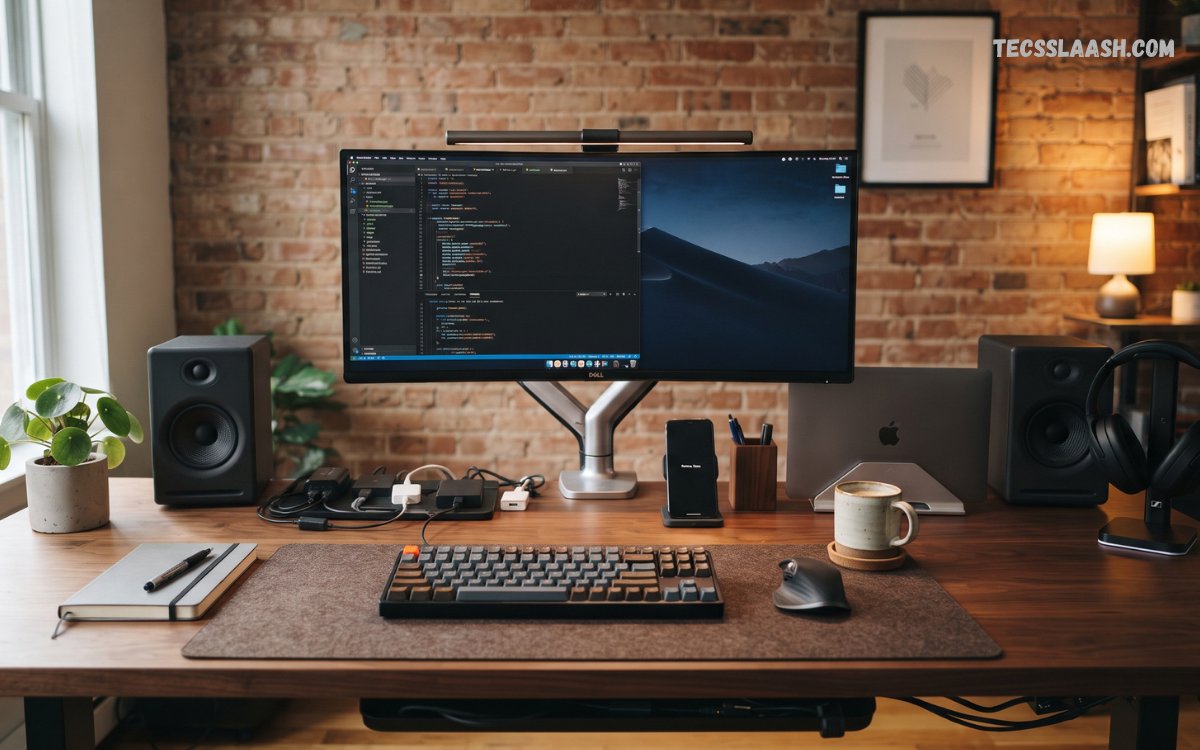
A well-designed desk setup can improve productivity, organization, comfort, and focus throughout the day. The Best Desk Setup Accessories can transform an ordinary workspace into a practical environment designed for work, study, gaming, and creative projects.
Choosing the right accessories does not require filling your desk with unnecessary equipment or expensive gadgets. A better approach focuses on useful products that improve ergonomics, reduce clutter, enhance connectivity, and create a comfortable working environment.
Best Desk Setup Accessories
The best desk accessories combine functionality, comfort, organization, and modern design in a single workspace. From monitor stands and desk mats to cable organizers and ergonomic accessories, every addition should serve a clear purpose.
A smart desk setup starts with essential accessories and expands according to individual needs. Selecting products based on desk size, computer equipment, daily tasks, and available space helps create a balanced and efficient workspace.
Monitor Stand
A monitor stand is one of the most useful accessories for improving desk ergonomics and organization. Raising the display to a comfortable viewing height can help create a more natural posture while also providing additional storage space underneath the monitor.
Monitor stands are available in different materials, sizes, and designs to suit various workspace styles. Models with compartments or drawers can provide convenient storage for notebooks, keyboards, accessories, and other small items.
Ergonomic Keyboard
A keyboard is an essential part of any computer workspace, making comfort an important consideration for long sessions. An ergonomic keyboard can provide a more comfortable typing position while supporting a cleaner and more organized desk layout.
Mechanical, low-profile, wireless, and ergonomic keyboards offer different experiences depending on personal preferences. Users should consider keyboard size, key layout, connectivity, wrist position, and typing requirements before choosing a model.
Wireless Mouse
A wireless mouse eliminates unnecessary cable clutter while providing flexibility around the desk. Modern wireless mice are available for productivity, creative work, gaming, and everyday computing.
When selecting a wireless mouse, consider its shape, sensor performance, battery life, connectivity, and button configuration. An appropriately sized mouse can make extended computer use more comfortable and efficient.
Large Desk Mat
A large desk mat can protect the desktop while creating a consistent surface for a keyboard, mouse, and other accessories. It also gives the workspace a cleaner appearance by visually connecting separate components.
Desk mats are available in fabric, leather-style, rubber, and other materials. A water-resistant and easy-to-clean surface can be especially useful for busy workspaces where food, drinks, and daily activities are common.
Cable Management Accessories
Cable management accessories are essential for maintaining a clean and professional desk setup. Cable clips, sleeves, trays, ties, and under-desk organizers can prevent cables from becoming tangled across the workspace.
Organized cables also make it easier to identify connections and maintain computer equipment. Planning cable routes before attaching organizers can create a cleaner result without making future upgrades difficult.
Desk Organizer
A desk organizer provides dedicated storage for frequently used stationery and small accessories. Pens, notebooks, USB drives, charging cables, and other items can remain accessible without occupying valuable working space.
Choose an organizer based on the items you regularly use rather than selecting the largest available option. A compact organizer can often provide better results because it encourages the desk to remain free from unnecessary clutter.
LED Desk Lamp
Good lighting is an important part of a comfortable workspace, particularly when working during evening hours. An LED desk lamp can provide focused illumination while adding a modern appearance to the overall desk setup.
Adjustable brightness and positioning can make a desk lamp more versatile for different tasks. Models with multiple lighting modes can provide flexibility for reading, writing, studying, or working with screens.
Monitor Light Bar
A monitor light bar is a space-saving lighting accessory designed to sit above a display. It can illuminate the desk surface without requiring the additional footprint of a traditional desk lamp.
Many monitor light bars offer adjustable brightness and color temperature settings. Their compact design makes them particularly useful for smaller desks where available surface area is limited.
Headphone Stand
A headphone stand provides a dedicated location for headphones when they are not being used. Keeping headphones off the desk can reduce clutter while protecting them from being accidentally knocked onto the floor.
Some headphone stands include additional USB ports or charging features. A simple stand can be sufficient for most users, while a multifunctional model may be useful for technology-focused workspaces.
Desk Shelf
A desk shelf adds vertical storage without consuming significant additional floor space. It can hold speakers, small plants, notebooks, controllers, decorative items, or frequently used equipment.
Using vertical space is particularly valuable on compact desks. A properly positioned shelf can separate equipment into different zones and make the main working surface easier to maintain.
USB Hub
A USB hub can expand connectivity when a computer does not provide enough ports for all required peripherals. It can make it easier to connect keyboards, mice, external drives, USB accessories, and other devices from a central location.
Before purchasing a USB hub, check the required port types and data-transfer requirements. Users who connect several high-speed devices should select a hub designed to support the necessary bandwidth.
Wireless Charging Pad
A wireless charging pad can reduce the number of charging cables required on a desk. It provides a convenient location for compatible devices while keeping the workspace visually cleaner.
Charging pads come in different sizes and designs, including compact single-device models and larger multi-device solutions. Compatibility and charging performance should be checked before selecting a specific option.
Monitor Arm
A monitor arm provides greater flexibility than a traditional monitor stand by allowing the display to be repositioned. It can free valuable desk space while making it easier to adjust the screen for different working positions.
Monitor arms are particularly useful for multi-monitor setups. Before installation, verify the monitor’s mounting standard, weight requirements, and desk compatibility.
Ergonomic Footrest
An ergonomic footrest can provide additional support when the desk and chair combination does not allow comfortable positioning of the feet. Maintaining a stable lower-body position can contribute to a more comfortable working posture.
Footrests are available in fixed and adjustable designs. A suitable model should allow the user to position their feet comfortably without creating pressure or restricting natural movement.
Desk Drawer
A desk drawer creates hidden storage for items that do not need to remain visible. It can be particularly useful for storing stationery, adapters, cables, notebooks, and other small equipment.
Under-desk drawers can preserve valuable desktop space while keeping frequently used items within reach. Adhesive and clamp-mounted designs can also provide storage without requiring permanent modifications to the desk.
Speakers
Compact desktop speakers can improve the audio experience for music, videos, meetings, and other everyday activities. They can also create a cleaner alternative to constantly using headphones.
When selecting speakers, consider desk space, connectivity, sound requirements, and power options. Compact speakers are usually better suited to smaller workspaces, while larger systems may require dedicated space.
Webcam
A webcam is useful for online meetings, classes, presentations, and video communication. A dedicated webcam can provide greater flexibility than a built-in laptop camera and can be positioned for a more suitable viewing angle.
Resolution is not the only factor to consider when choosing a webcam. Autofocus, microphone quality, low-light performance, mounting options, and software compatibility can also affect the overall experience.
18. Cable Tray
A cable tray mounted underneath the desk can keep power adapters and excess cables away from the main working surface. This creates a cleaner appearance while making the floor area easier to manage.
Cable trays are available in different lengths and mounting styles. Selecting a tray that accommodates existing power adapters while leaving room for future devices can make long-term cable management easier.
Desk Pad Organizer
A desk pad with integrated storage can combine workspace protection with organization. Some designs provide dedicated areas for notebooks, phones, pens, or other frequently used accessories.
This type of accessory is useful for users who prefer minimal setups. Combining multiple functions into one product can reduce the number of separate accessories occupying the desk.
Comfortable Desk Chair Accessories
A comfortable chair is important for any workstation, while accessories can further improve the overall seating experience. Lumbar cushions, seat cushions, and adjustable foot supports may help users create a more personalized workspace.
Accessories should complement proper chair adjustment rather than replace an unsuitable chair. Seat height, back support, desk height, and monitor positioning should work together as part of the complete workstation.
How to Choose the Best Desk Setup Accessories
Choosing the Best Desk Setup Accessories starts with identifying the problems that need to be solved. If the desk feels cluttered, prioritize cable management and storage, while users experiencing workspace discomfort should focus on ergonomic improvements.
Budget is another important factor when building a desk setup. Start with essential accessories that provide practical benefits before investing in decorative or specialized equipment.
Read Also: Best VR Accessories: Essential Upgrades for a Better Virtual Reality Experience
Minimalist Desk Setup Accessories
A minimalist desk setup focuses on keeping only essential equipment within the working area. A monitor stand, wireless keyboard, wireless mouse, desk mat, cable organizer, and compact lamp can provide a strong foundation without excessive clutter.
Minimalism does not mean removing useful technology from the workspace. Instead, it means organizing equipment carefully so every item has a clear purpose and the desk remains easy to maintain.
Best Accessories for a Gaming Desk
Gaming desks can benefit from accessories such as large desk mats, monitor arms, headphone stands, cable management systems, controller holders, and ambient lighting. These products can improve organization while supporting gaming equipment and other computer peripherals.
A gaming setup should still prioritize comfort and usability. Proper monitor positioning, comfortable peripherals, organized cables, and sufficient desk space can create a better environment for longer gaming sessions.
Best Accessories for a Work-from-Home Desk
A work-from-home setup benefits from accessories that improve organization, communication, and productivity. A monitor stand, webcam, desk lamp, keyboard, mouse, USB hub, and cable management system can create a practical home workstation.
Storage is also important when the desk serves multiple purposes. Desk drawers, shelves, and organizers can help separate work equipment from everyday household items.
Benefits of a Well-Organized Desk Setup
An organized desk can make frequently used equipment easier to locate and reduce distractions caused by unnecessary clutter. Clear organization also makes it easier to clean the workspace and maintain a consistent routine.
Ergonomic accessories can contribute to a more comfortable workstation when they are selected and positioned correctly. Combining organization, suitable lighting, comfortable peripherals, and sensible screen placement creates a more functional environment.
Frequently Asked Questions
What are the Best Desk Setup Accessories?
The Best Desk Setup Accessories include monitor stands, ergonomic keyboards, wireless mice, desk mats, cable organizers, desk lamps, monitor arms, USB hubs, headphone stands, and desk organizers. The ideal selection depends on your workspace, budget, equipment, and daily activities.
How can I make my desk setup look better?
Start by removing unnecessary items and organizing cables before adding new accessories. Matching functional accessories, using consistent storage solutions, and maintaining an uncluttered desktop can create a cleaner appearance.
What desk accessories improve productivity?
Monitor stands, ergonomic keyboards, wireless mice, desk organizers, cable management systems, suitable lighting, and USB hubs can improve workspace functionality. Their value depends on how effectively they solve specific problems in your daily routine.
Are desk accessories worth buying?
Useful desk accessories can be worthwhile when they provide a clear improvement in organization, comfort, connectivity, or workspace efficiency. Prioritize practical products instead of purchasing accessories simply because they are popular.
What are the best accessories for a small desk?
Small desks benefit from space-saving accessories such as monitor arms, monitor light bars, compact wireless peripherals, cable trays, and vertical desk shelves. These products can provide useful functionality without taking excessive surface space.
How do I organize cables on my desk?
Start by identifying every cable and removing connections that are no longer needed. Use cable clips, sleeves, ties, and under-desk trays to route remaining cables neatly toward their power and device connections.
What is the most important desk accessory?
There is no single accessory that is most important for every user. Monitor positioning, comfortable peripherals, cable management, and appropriate lighting are strong priorities because they directly affect workspace usability.
How do I create a minimalist desk setup?
Keep only the equipment required for your regular activities and store everything else away from the main work surface. Wireless peripherals, hidden cable management, vertical storage, and multifunctional accessories can help maintain a minimalist appearance.
What accessories are useful for a home office?
A home office can benefit from a monitor stand or arm, keyboard, mouse, webcam, desk lamp, USB hub, cable organizer, and storage accessories. The right combination depends on whether the workspace is used primarily for meetings, studying, writing, design, or general computer work.
How much should I spend on desk setup accessories?
There is no fixed budget required for creating a good desk setup. Build the workspace gradually, prioritizing accessories that address your biggest comfort, organization, or productivity problems before purchasing optional upgrades.
Conclusion
The Best Desk Setup Accessories are not necessarily the most expensive products available. The best choices are accessories that solve real workspace problems, improve organization, support comfort, and fit naturally into the available space.
A successful desk setup can be built gradually by starting with essential accessories and adding products based on changing requirements. Whether the goal is a professional office, gaming station, study desk, or minimalist workspace, thoughtful accessory selection can create a cleaner and more productive environment.

