


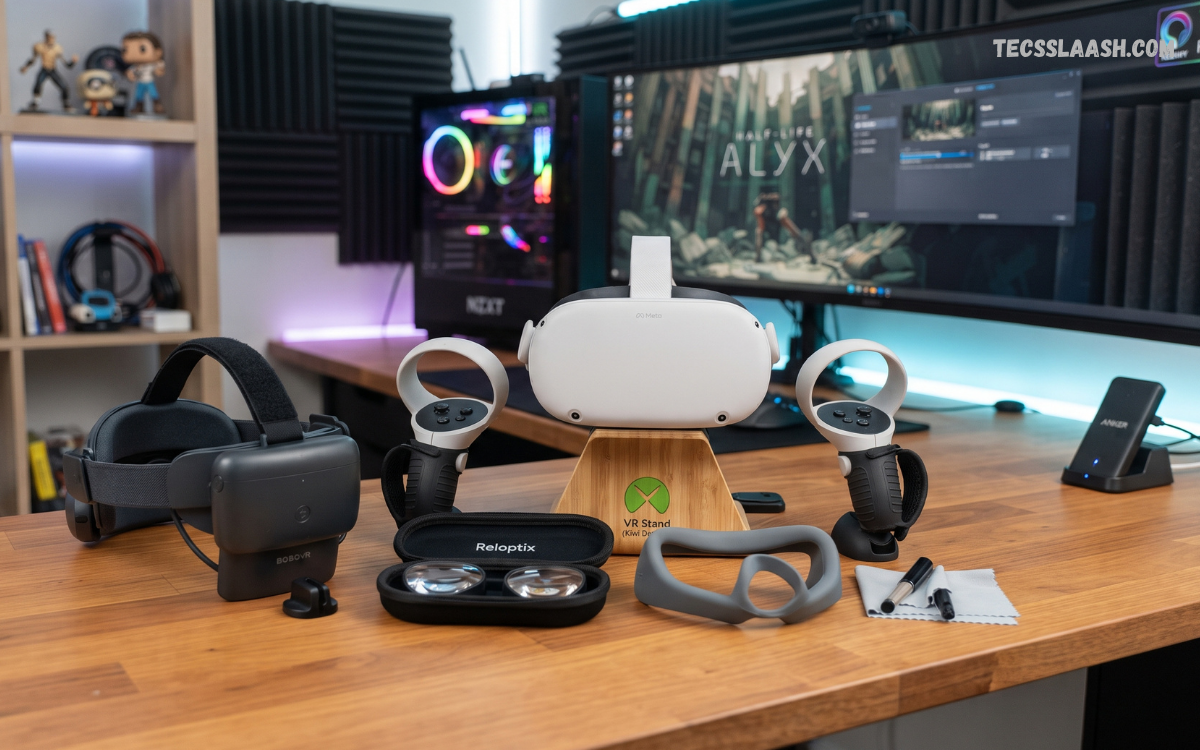
Virtual reality has evolved into a powerful form of gaming, entertainment, fitness, education, and immersive experiences. While a modern VR headset can deliver an impressive experience on its own, the Best VR Accessories can improve comfort, battery life, audio, protection, convenience, and overall immersion.
Choosing the right accessories depends on your headset, how you use VR, and how frequently you play. Current VR accessory guides commonly highlight upgraded head straps, controller grips, charging solutions, carrying cases, audio accessories, facial interfaces, and PC connection cables as useful upgrades.
Why Do VR Accessories Matter?
A VR headset is only one part of a complete virtual reality setup. The right accessories can address common issues such as uncomfortable straps, limited battery life, difficult storage, controller handling, and cable management.
Instead of purchasing every available accessory, focus on products that solve a specific problem. A comfortable head strap may be more valuable for long sessions than an expensive immersion accessory if the original strap causes pressure or poor weight distribution.
Comfortable VR Head Strap
A replacement head strap is one of the most practical upgrades for frequent VR users. Better-designed straps can distribute the headset’s weight more evenly and provide additional adjustment compared with basic straps.
Battery-equipped straps can provide another advantage by combining improved support with additional power. Some current accessory guides specifically recommend battery head straps because they can improve balance while extending playtime.
When choosing a strap, check its compatibility with your exact headset model. Quest 2, Quest 3, Quest 3S, PS VR2, and other headsets can require different mounting systems.
VR Controller Grips
Controller grips can make VR controllers easier to hold during longer sessions. They can also provide additional security when playing games that involve frequent hand movement.
Look for grips that fit your specific controllers and do not interfere with buttons, tracking, charging, or battery access. Comfort and secure handling should be the main priorities rather than simply choosing the most expensive option.
Charging Dock
A charging dock can make a VR setup considerably more convenient. Instead of connecting individual cables whenever the headset or controllers need power, a dedicated dock can provide a central charging location.
A good charging solution should be compatible with your headset and controllers and should allow you to place the equipment securely. Current VR accessory recommendations include charging stations as useful upgrades for keeping the complete setup organized.
VR Carrying Case
A protective carrying case is particularly useful if you regularly move your headset between rooms or travel with it. A properly designed case can protect the headset, controllers, cables, and other accessories from accidental damage.
Hard-shell cases generally provide stronger protection than soft storage bags. Before buying one, check the internal dimensions and make sure it supports your exact headset and the accessories you intend to carry.
VR Facial Interface
The facial interface is the part of a headset that rests around your face. Upgrading it can improve comfort and make cleaning easier, especially for users who spend significant time in VR.
Materials such as silicone or other easy-to-clean surfaces can be practical for active sessions. However, the interface should fit correctly without blocking sensors, cameras, ventilation, or other important headset components.
VR Audio Accessories
Audio plays an important role in making virtual environments feel more immersive. Dedicated headphones or earbuds can provide stronger spatial audio and clearer sound than basic built-in speakers, depending on the headset.
Wireless audio can reduce cable clutter, while wired audio may be useful when low latency and reliable connectivity are priorities. Some current VR accessory recommendations specifically highlight spatial audio headphones as an upgrade for enthusiasts.
VR Link Cable
A high-quality link cable can be useful for compatible standalone headsets that support PC VR. It can provide a wired connection between the headset and computer for supported VR applications.
Cable length is important because a short cable can restrict movement. Always verify the required connector, headset compatibility, computer requirements, and supported connection standards before purchasing.
Lens Protection Accessories
VR lenses are an important part of the headset and should be handled carefully. Protective solutions can help reduce the risk of scratches when storing or transporting the device.
People who wear glasses should pay particular attention to lens clearance and compatibility. Never install an accessory that presses directly against the lenses or interferes with the headset’s optical system.
VR Controller Charging Solution
Rechargeable controller batteries and charging solutions can reduce the inconvenience of repeatedly replacing disposable batteries. A dedicated charging setup can also help keep the headset area organized.
Compatibility is essential because controller designs vary between VR platforms. Check whether the charging system supports your specific controller model before purchasing.
VR Stand
A VR stand provides a simple place to store your headset when it is not being used. It can also keep controllers and other equipment together rather than leaving them scattered around a desk or shelf.
Some stands are designed for multiple headset models and include areas for controllers or charging cables. Current accessory guides recommend stands as a convenient organization solution for different VR systems.
VR Cable Management
Cable management becomes especially important with PC VR systems. Properly arranged cables can keep your play area more organized and reduce unnecessary cable movement.
Use cable-management solutions designed specifically for your setup and maintain a clear play space. A tidy environment is especially important when you are moving around while wearing a headset because you cannot see your surroundings normally.
VR Floor Mat
A VR floor mat can help create a consistent physical reference point in your play area. Feeling the edge or surface of the mat can remind you that you are approaching the boundary of your designated space.
Choose a mat that stays firmly on the floor and does not create a tripping hazard. Your VR play area should always remain clear of furniture, pets, cables, and other obstacles.
Battery Pack
A compatible battery pack can extend the usable time of a standalone VR headset. This can be particularly useful when the headset’s built-in battery does not provide enough time for your planned session.
However, additional batteries also add weight and may affect comfort. A battery-equipped head strap can sometimes provide a more balanced solution because the additional weight is positioned toward the back of the head.
VR Cleaning Kit
Regular cleaning is an important part of maintaining a VR headset. A suitable microfiber cloth and manufacturer-approved cleaning approach can help keep the lenses and exterior surfaces clean.
Avoid using unsuitable chemicals or rough materials on optical surfaces. Always follow the cleaning instructions provided for your particular headset.
VR Headset Storage Solution
A dedicated storage solution helps protect your equipment between sessions. Keeping the headset away from direct sunlight, excessive heat, moisture, and unnecessary dust can support better long-term maintenance.
A storage stand can work well for a home setup, while a protective case is more appropriate for transportation. The best choice depends on whether your priority is accessibility, protection, or portability.
How to Choose the Best VR Accessories
The first step is identifying your headset model. Accessories are often designed for specific devices, and buying an incompatible product can lead to poor fit or limited functionality.
Next, identify the biggest weakness in your current setup. If comfort is the issue, prioritize a head strap or facial interface; if battery life is the problem, consider a compatible charging or battery solution.
Best VR Accessories for Comfort
For comfort-focused users, a replacement head strap is usually a logical starting point. A properly balanced design can make the headset feel more secure and reduce pressure during longer sessions.
A suitable facial interface can complement the strap by improving the area where the headset contacts your face. Together, these upgrades can make a noticeable difference without changing the core VR hardware.
Best VR Accessories for Longer Sessions
Users who frequently spend extended periods in VR may benefit from accessories focused on battery life and comfort. Battery head straps are popular because they can combine additional power with improved weight distribution.
Charging accessories are also useful because they make it easier to keep the headset ready for the next session. A consistent charging routine can prevent the frustration of discovering that your headset is almost empty when you want to use it.
Read Also: Best Android Accessories: Essential Picks for a Better Smartphone Experience
Best VR Accessories for Travel
A protective carrying case should be one of the first considerations for people who travel with VR equipment. A good case should provide dedicated space for the headset, controllers, charging equipment, and essential accessories.
Compact storage is another advantage because VR equipment can occupy considerable space without proper organization. Current accessory recommendations include hard cases as practical solutions for transporting and protecting headsets.
Best VR Accessories for PC VR
PC VR users may need accessories that focus on reliable connectivity and cable management. A suitable link cable can provide a wired connection for compatible standalone headsets, while cable-management accessories can help keep the play area organized.
Audio can also be important for PC VR. A good pair of compatible headphones can improve spatial awareness and make games, simulations, and virtual environments feel more immersive.
Are Expensive VR Accessories Worth It?
Price alone does not determine whether an accessory is worthwhile. The best accessory is the one that solves a real problem and works reliably with your particular headset.
For example, someone who only plays short sessions may not need a premium battery strap. A user who frequently plays for longer periods may find that a comfort-focused or battery-equipped strap provides much greater value.
Compatibility Comes First
Compatibility should always be checked before purchasing any VR accessory. Even accessories that look similar can use different mounting systems, connectors, controller layouts, or software requirements.
Check the manufacturer’s compatibility information and compare it with your exact headset model. This simple step can prevent unnecessary returns and ensure that your accessories work as intended.
Frequently Asked Questions
What are the Best VR Accessories?
The Best VR Accessories include comfortable head straps, controller grips, charging docks, carrying cases, facial interfaces, headphones, link cables, and protective storage solutions. The ideal combination depends on your headset and how you use VR.
Which VR accessory should I buy first?
A comfortable head strap is a strong first upgrade if the original strap feels uncomfortable. If comfort is already good, consider a carrying case, charging solution, or controller grips based on your needs.
Are VR battery straps useful?
Yes, a compatible battery strap can extend headset runtime while potentially improving weight balance. However, additional weight and headset compatibility should be considered before buying one.
Do all VR accessories work with every headset?
No, VR accessories are not universally compatible. Always check whether an accessory specifically supports your headset model and controller generation.
Are VR carrying cases necessary?
A carrying case is especially useful if you travel with your headset. It provides organized storage and can help protect the headset and controllers from accidental damage.
Are VR headphones worth buying?
Dedicated headphones can improve sound quality and immersion, particularly when spatial audio is important. However, whether they are worthwhile depends on the quality of your headset’s built-in audio and your personal preferences.
What accessories are useful for PC VR?
PC VR users may benefit from a reliable link cable, suitable headphones, and cable-management equipment. The exact accessories depend on the headset and computer configuration.
How can I keep my VR headset clean?
Use appropriate cleaning materials and follow the headset manufacturer’s instructions. Avoid rough cloths and unsuitable cleaning chemicals, particularly around the lenses.
What should I check before buying VR accessories?
Check compatibility, build quality, comfort, connectivity, dimensions, and the accessory’s intended purpose. Choosing based on your actual needs is generally better than purchasing accessories simply because they are popular.
Can VR accessories improve immersion?
Yes, accessories such as better audio, controller grips, comfortable interfaces, and specialized peripherals can make virtual experiences feel more natural. However, immersion improvements vary depending on the headset, software, and type of accessory.
Conclusion
The Best VR Accessories can transform a basic VR setup into a more comfortable, organized, and enjoyable experience. From head straps and controller grips to charging docks, carrying cases, audio equipment, and link cables, every accessory should have a clear purpose.
The smartest approach is to upgrade based on your personal needs rather than buying everything available. Start with comfort and protection, then consider battery life, audio, connectivity, and specialized accessories as your VR experience develops. Current 2026 accessory guides similarly emphasize comfort, battery solutions, protection, connectivity, and organization as the major upgrade categories.

